Booking notice
- The name, country of residence, and passport number provided during booking must match the passport information presented when boarding.
Pass eligibility
Note: Infants and children will be counted as passengers
- Important note: Please specify the total number of adults and children aged 0–11 when booking
- Adult pass holders (excluding senior passes) can bring two children aged 0–11 for free.
- Each adult rail pass holder can bring 2 children for free, and a youth pass must be purchased from the third child onward.
- Only non-European residents can use the Eurail pass
- To be considered a resident of a country, you must have stayed there for more than six months and provide proof of residence or citizenship when traveling by train.
- Citizenship proof: passport; proof of residence: government-issued documents such as a visa or residence card
- If you have resided in country A for more than six months but hold a passport from country B, you can choose to fill in country A as your country of residence at checkout and provide your passport and proof of residence on the train, or fill in country B as your country of residence at checkout and provide your passport on the train.
Activation process
- Download the eurail/interrail rail planner app to use the mobile pass within 11 months from the date of purchase
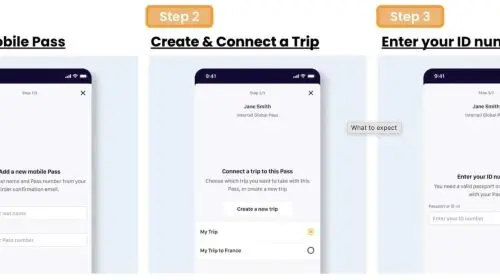
- Step 1: Enter the sent last name and pass number to add the pass
- Step 2: Link the itinerary to your pass by creating a new itinerary or selecting an existing one
- Step 3: Enter passport/ID number and select travel date to activate your pass
Please note that you cannot board the first train unless your pass is activated, and you need to be online to activate your pass
- Please note that you do not need to activate the pass to book a seat
- Your phone must be set to the Gregorian calendar to activate the pass in the rail planner app.
- For more details on how to activate the pass, please refer to the eurail pass ultimate guide
Group travel
- If you're traveling in a group and have loaded multiple passes on your device, please note the following:
- Each pass requires creating a separate itinerary in the app.
- If you have already created an itinerary, you can copy the existing one and link the copy to another pass. Please name each itinerary to keep track of all your itineraries.
- During ticket inspection, you need to present the pass for all visitors using the pass. Simply select another pass from the my pass list and click "Show ticket".
Seat reservation process
- Most domestic high-speed trains, international trains, scenic view trains, and night trains require advance seat booking.
- Bookings can be made atEurail websiteOr Eurail/InterrailRail planner appTo view the final price and seat availability, you must sign in and hold a pass to proceed.
- Alternatively, you can also visit the local train station orRailway operator websiteBook
- You do not need to activate the pass to book a seat
Please present both the e-voucher and passport
How to use the eurail mobile pass
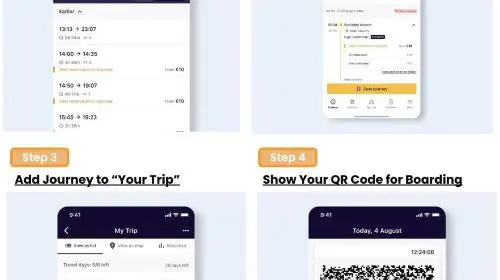
After activating the eurail pass, follow these steps to start your journey
Step 1: Search for train times and plan your itinerary using the Eurail/Interrail rail planner app
Step 2: Tap to save the itinerary to your itinerary
Step 3: When ready to depart, tap to add itinerary to your pass
Step 4: For check-in, simply go to "my pass" and tap "show pass" to present your mobile pass.
Please note that each day in the pass has different passes, and each pass will display all itineraries you've added for that day.
Only for flexible passes: If your trip date is not yet a travel day, you need to use one of your travel days
You can check your remaining travel days and view an overview of all travel days in my trips and my passes.